
nutshells
hi!! this is an internal page that contains the content of the Nutshells that we link to throughout README. feel free to read through them here!
: component: clubs
Hack Clubs are student-led after-school coding
clubs where teens are building the class they wish they could take. Hack Clubs
usually meet once a week after school, and members participate in workshops,
build awesome technical projects, and demo them to their peers and the world 🌎
Club leaders get access to a huge library of free workshops and jams to help their members learn new skills, as well as free stickers & posters, a nonprofit fund via HCB to help fundraise, a whole host of perks (like Zoom pro!) and a supportive community of other club leaders around the world. Sometimes, Hack Club will host a club-only YSWS event like #raspite where you ship a website for your club and Hack Club will ship a raspberry pi to host the website on.
: component: slack
The Hack Club Slack is a huge online
community (~20k active members) of teen hackers, builders, coders, writers,
artists, filmmakers, and more. It’s the perfect place to ask questions, get help
with your projects, find collaborators, share your work, and meet other awesome
people from around the world. Across hundreds of active channels, you’ll find
awesome people chatting about everything from the 67 meme to web development,
game jams, and music production.
Join at hackclub.com/slack.
: component: minecraft
One of the random silly things Hack Club has is a
Minecraft server! Its like a whole ecosystem with shops and free public farms
and frigging highways!?!?!?!?! whaaaaaa-
Join the #minecraft channel!
: component: ysws
At Hack Club, we believe the best way to learn is
to build & ship real projects - that’s why we run a huge variety of “You Ship,
We Ship” (YSWS) programs & events throughout the year. Most of these programs
follow a similar format: you build something awesome, ship it to the world, and
we’ll physically ship you some cool stuff to help you keep building! Previous
YSWS programs have granted domain credits, drawing robots, microcontrollers,
stickers, t-shirts, and more.
Check out the current YSWS programs at ysws.hackclub.com. An awesome starter YSWS is Boba Drops - build your first website and get $5 to spend on boba!
: component: programs
Throughout the year, Hack Club HQ runs multiple
large-scale virtual events to help you learn new skills & get awesome stuff to
help you build your projects. We usually run a summer and winter “general YSWS”
- where you can build anything you want, ship it to get a virtual currency, and spend that currency on things like laptops, hosting credits, swag, 3D printers, and more. Past examples include Summer of Making (summer 2025), and High Seas (winter 2024).
We’ve also run more specialized events like Highway (build hardware projects, get them funded), Milkyway (code games, get prizes), and Siege (ship something every week for 10 weeks, get a Framework laptop).
: component: abbreviations
We have many abbreviations but some to note are:
- FS: this means Fraud Squad! They are the team that make sure your projects were made by you and more! You can contact them on slack by DMing the bot: @Fraud Squad!
- FD: this is the Fire Department! They moderate slack, making sure that everyone is sensible to keep and kind and happy community! You can contact the Fire Department through @Shroud on Slack! You can also ask in #fire-dept for general questions or new updates! Remember, the channel is public!
- HC: this is a short version of ‘Hack Club’! Very simple to understand, and is just easier to type!
- HQ: in real life, HQ means Headquarters - and it means the same here! Hack Club’s HQ is based in Vermont!
- DMs: the same as normal! A direct message with another user, that is private to you!
- OOC: this means: “Out of Context”! If you find a message that is funny without context, you can forward it (only with the writer’s permission) to @Out of Context, and if approved, is put in the #out-of-context channel!
- PC: this has a few meanings! Firstly, personal computer, as per usual. It can also mean personal channel or even personal confession (normally in #confessions)! There are more, but these are the key ones to know!
: component: hq events
Hack Club runs multiple IRL events throughout
the year. Over time we’ve hosted 150 teens for a hardware hackathon at GitHub
HQ, built a hacker cafe in
Shanghai, turned a Vermont campground into a
hacker oasis, and so, so much
more. These adventures are special - you’ll build amazing technical projects
while making lifelong friends in amazing places around the world.
Hack Club events are usually merit-based, meaning that the only condition to attend is building awesome projects and submitting them to the program! Your experience will be fully funded, including lodging, food, local transit, etc. Flight stipends (possibly need-based ones as well) are often available too.
component: satellites
A few times a year, Hack Clubbers across the world
come together to host “satellite hackathon” events - hundreds of local,
teen-organized, in-person hackathons happening simultaneously worldwide. These
events are a great way to meet other local hackers, build cool projects, and
have fun with friends! Past examples include
Daydream (simultaneous game jams in 100+
cities), and Scrapyard (a hackathon for stupid
ideas, in 50+ cities). Community members also frequently organize their own
local hackathons - check out
hackathons.hackclub.com to find one near you!
Satellite hackathon organizers get access to funding, swag, mentorship from Hack Club HQ, and a supportive community of other teen organizers around the world.
: component: hcb
HCB is the foundation for your nonprofit. Apply to
create a nonprofit fund in minutes, then raise money with US 501(c)(3)
tax-exempt status, automatic taxes & accounting, pre-made donation pages, and
access to perks like a free domain and Google Workspace. Issue physical and
digital cards to spend your nonprofit dollars, reimburse via check, ACH, and
more, and optionally make your finances public to build trust with your
community.
HCB has been used to raise more than $67 million for projects that make the world a better place. No minimum balance, no credit card fees, just a simple 7% fee on income to cover operational costs. Apply now.
: component: internship
As an intern or gappie, you’ll work closely
with HQ staff to build and maintain programs, events, and resources for the Hack
Club community. Even if you’re not technical or a 10x programmer or have a lot
of experience with technology, you should apply anyway when applications open.
Hack Club chooses the people they think will run the best YSWS programs next
year, not the most impressive people or the people with the most credentials,
but it wouldn’t hurt to contribute to Hack Club through open-source or running a
good Hack Club club at your school or by hosting a high-quality YSWS
event/hackathon.
These are paid, full time positions. You’ll get to live and work with some of the most talented and passionate teen hackers in the world. Internships are usually 8-12 weeks long during the summer, while gap years are for teens that want to take a year off between high school and college to work full time at Hack Club HQ.
: component: physical hq
Hack Club HQ is a physical space in Shelburne, Vermont!

Hack Club HQ is a cozy, creative space where Hack Club staff, interns, and gap years work on building and maintaining the organization. Hack Club also has an office called the Tracy office which is a 15 minute drive (2 hour and 30 minute walk) from HQ for HCB. And there’s another HQ building in San Fransico but the HQ in Vermont is the only building Hack Club fully occupies. If you’re in the area, DM a gappie or ask in #hq if you can pop by for a short visit!
: component: slack
The Hack Club Slack is where everybody is! Hackers organize YSWS and hackathons in the Slack and talk to other hack clubbers in the Slack.
There are so many channels in the Slack. You aren’t added to all of them when you join so you’ll have to use the search bar to find channels, but if you search up the name of what you’re looking for like #peotry or #linux the chances are that there is a channel for that subject. If you can’t find it, you could always ask in #community or #lounge
: wait whats a hacker
Traditionally, a hacker is a bad guy that breaks into computers to do bad things but at Hack Club, “hacker” means the same thing as “baker.” You call someone who bakes a baker, so one who hacks projects together and breaks things to understand them a hacker. A hacker is simply someone who solves problems in creative ways - usually with code. Hackers build, iterate, break, and ship things that make the world better. if you’re someone who likes to tinker, create, and learn new things, then congratulations: you’re a hacker!
Chris Walker wrote an essay that goes deeper into what a hacker is at Hack Club and how it differs from an engineer here if you want to read it.
: how do i start a thread
Hover over the message like this:
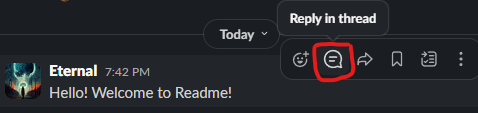
Click on the “reply in thread” button that looks like a message bubble to create a thread! If the message was sent inside a thread, you can’t create a thread with that message because threads can’t be nested.
: whats a grant?
A grant is a virtual debit card given out by
HCB restricted to certain merchants for a specific
purpose (like buying boba!). Cards given out by HCB can be added to Apple or
Google wallet and be used like a regular card with tap-to-pay. Each grant is its
own separate card.
If you spend your own money instead of the money on the card, you can apply for a reimbursement (you have to keep the receipt as proof). The money will be sent to your bank account. If the grant has money left after you buy what the grant was given out for, the rest of the money is sent back the the YSWS event that issued the grant.
: hack club data privacy
Privacy and security are taken very seriously.
Only a small group of trained Hack Club staff under strict NDAs are allowed to see the documents. After the student is verified to be a student, reviewers lose access and the files can only be accessed again by senior staff (and even then, access is logged). The entire server itself is separated from other Hack Club systems to reduce a risk of a hack, and 2 physical keys are required to unlock the physical server and get access to its hardware.
Read more about how Hack Club handles security and privacy in a Google doc here. If you’ve joined the Slack, you can also read a slightly more up-to-date version with more details here.
: how to verify teen
Go to https://auth.hackclub.com, login, and click on “ID Verification” on the sidebar or click this link to go there directly. Then, follow the instructions.
If you’re from India, read this section about India and Aadhaar in this Slack canvas: https://hackclub.enterprise.slack.com/docs/T0266FRGM/F0945AV6AKA
: component: everything is on github
A majority of Hack Club’s code is open-source on their GitHub. Check it out and maybe contribute?
: how to use slack
- Slack crash course: https://hackclub.enterprise.slack.com/docs/T0266FRGM/F07QCJ61T32
: how to make a channel
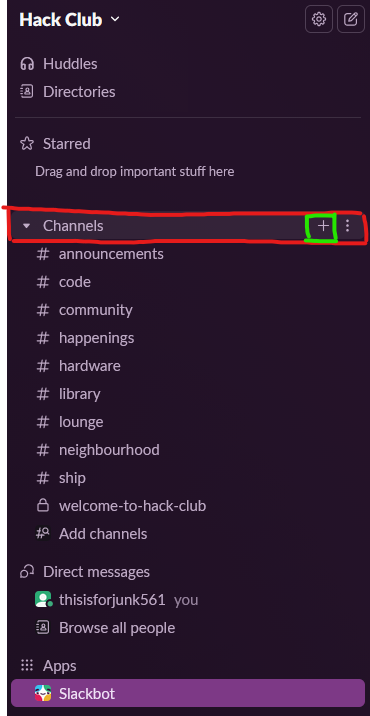
On desktop, hover over the word “channels” on the sidebar. When you hover over it, the plus icon will appear (highlighted in green in the image). Click on it to make a channel.
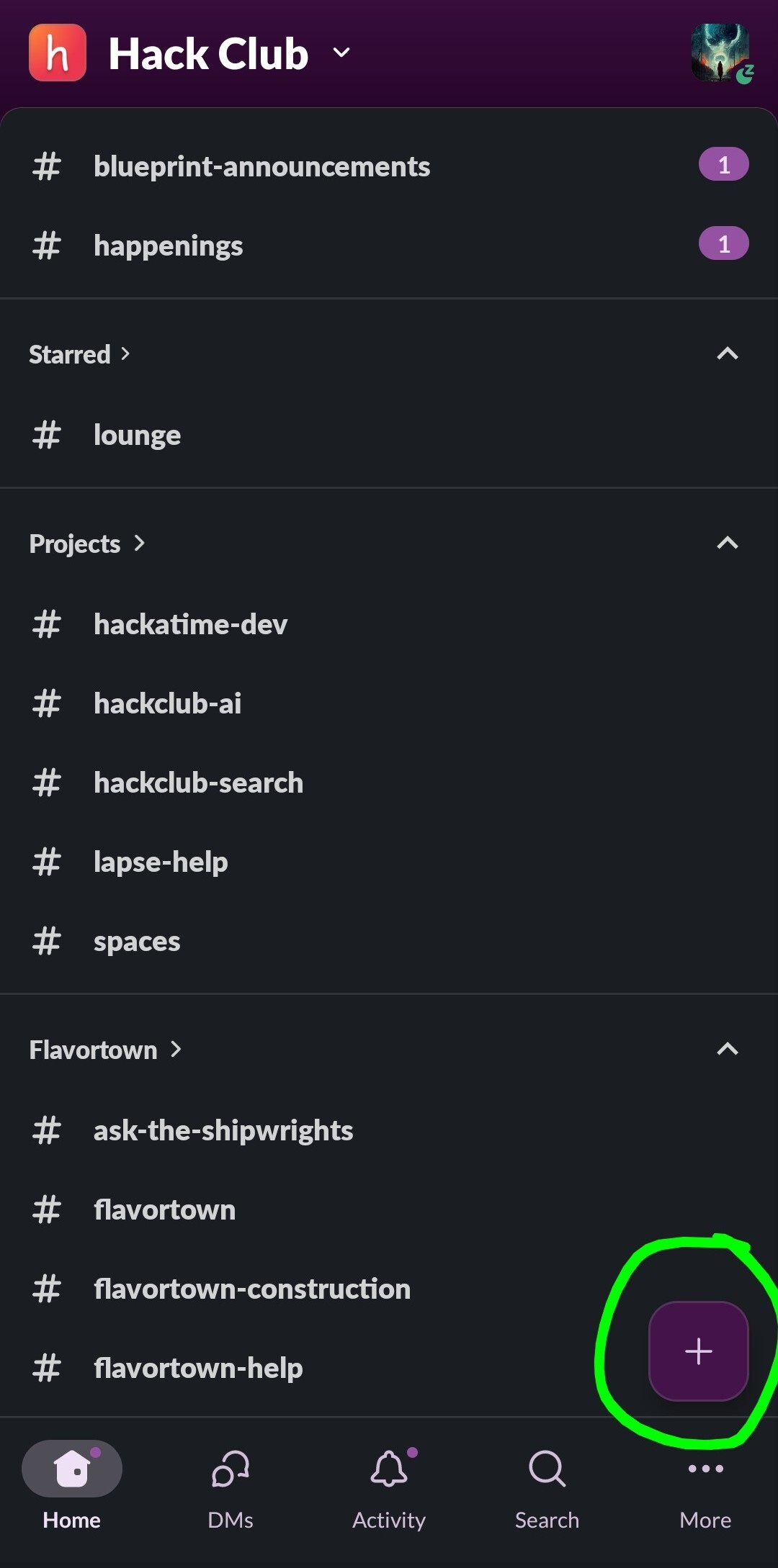
In the mobile Slack app, click the plus icon near the bottom right.
: funfacts slack bot example
Example: hi -> hello
In the previous example, the message the user sent is “hi” and the response from the bot is “hello”
: make github account
Create your GitHub account by visiting https://github.com/signup
: download git
If you’re on Linux, I trust you know how to Google.
If you’re on Mac, install Homebrew and then run
brew install wgetIf you’re on Windows, visit https://git-scm.com/install/windows and click the “Click here to download” text to download the installer.
: set up git
Open a Terminal (or the cmd if you’re on Windows) and run
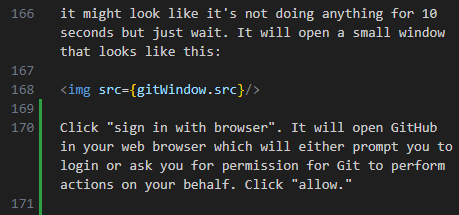
git credential-manager github loginit might look like it’s not doing anything for 10 seconds but just wait. It will open a small window that looks like this:
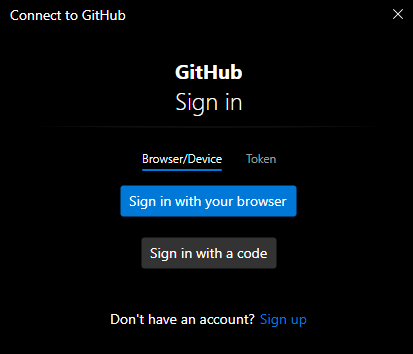
Click “sign in with browser”. It will open GitHub in your web browser which will either prompt you to login or ask you for permission for Git to perform actions on your behalf. Click “allow.”
: using git
I’m going to assume you’re using VSCode. If you use anything else, you’re probably smart enough to figure out Git for yourself by Googling or looking at YouTube videos. If you’re a beginner, it’s best for you to learn common terminal commands and how paths work and become comfortable in the terminal, but I’ll show you how to do things though VSCode.
As you make your changes, VSCode will indicate which lines are new
which lines are changed
and which lines are deleted
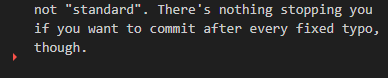
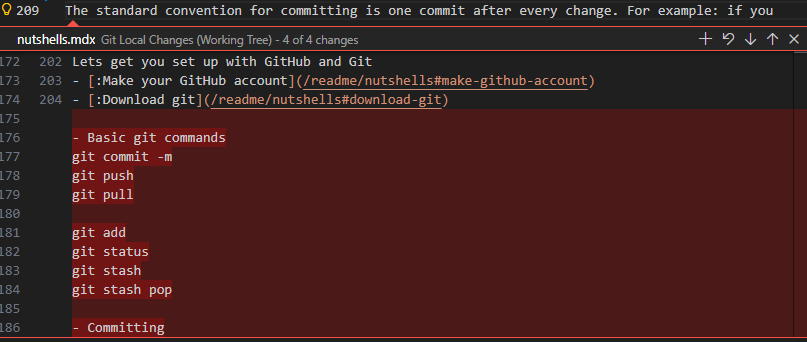
If you click on the red arrow on the left side, a window will popup that will allow you to scroll to see the lines that were deleted.
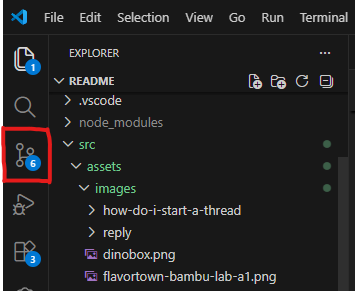
To push your changes to GitHub, click on this symbol on the sidebar
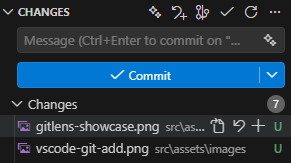
To actually commit your changes to the repo, hover over the file you want to add and click the plus icon to stage it.
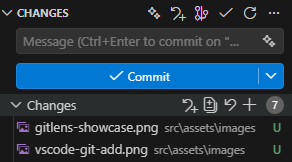
You can also stage all the files you made dhanges to by hovering over the word “changes” and clicking the plus button
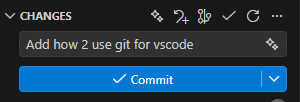
Add a commit message that discribes what you’re adding and press “commit”
aaand push your changes up to the repo!
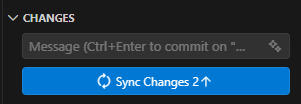
If this is the first time you’re committing, VSCode might prompt you to create a public/private repo and choose the name of your repo. If you have changes to other files you haven’t committed, the “sync” button won’t be displayed.
A quality-of-life extention I recommend GitLens. GitLens shows you which lines were changed by who when you select that line.
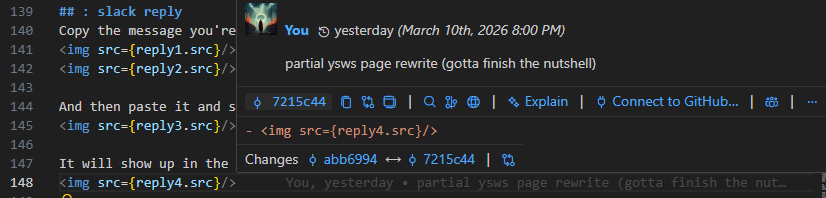
These are the basics to Git. There are more Git features like branches and partial-commits where you can selectively commit parts of a file instead of the whole file or undoing commits and other features, but you can learn those on your own. There are plenty of Git tutorials on YouTube.
: ysws-wait-im-a-beginner
IDE stands for “Integrated Development Environment.” It’s where developers write their code.
Git and GitHub are used to track code changes (sometimes called “version control”). GitHub is where the code and information about code changes (called commits) are stored. Git is the tool that tracks the code changes and sends the changes to GitHub. They both have “git” in their name but they are different.
Lets get you set up with GitHub and Git
-
Committing: You should commit your code every so often so that your changes are tracked and you can see the evolution of your codebase. The standard convention for committing is one commit after every change. For example: if you were fixing typo’s in your site, you’d commit after you fixed all the typo’s in your website and commit all the changes at once in one commit. You wouldn’t commit once after every typo fix. I mean, you could but thats not “standard”. There’s nothing stopping you if you want to commit after every fixed typo, though.
If you’re a beginner, then you should really look at the Workshops Hack Club offers. It has short, digestible lessons that slowly teach you about JavaScript and HTML and the DOM and the like.
: how to start a huddle
Find this headphones icon in the top right of the screen and click it.
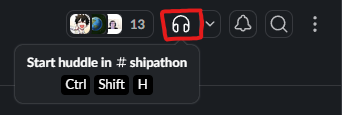
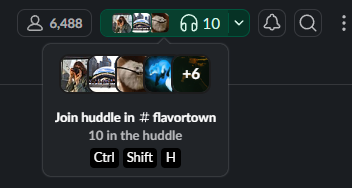
If a call has already started, it will be a green icon. Clicking it will make you join the call.
: how to make an emoji
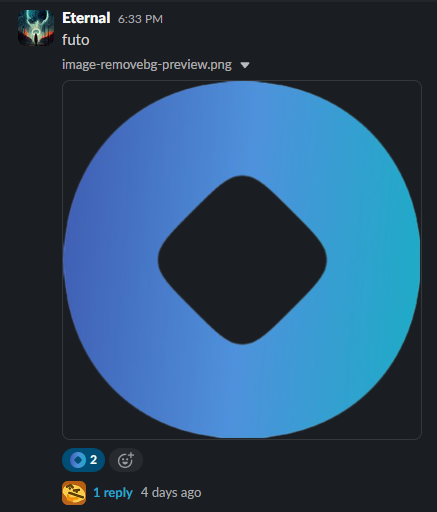
Join the #emojibot channel send a message with an image attached. The image will become the emoji and the text will be the name of the emoji.
Example:
: how to make a canvas
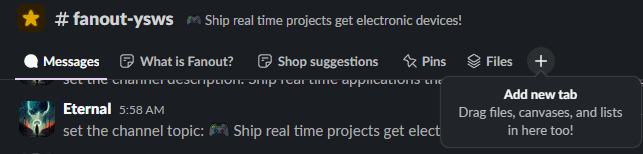
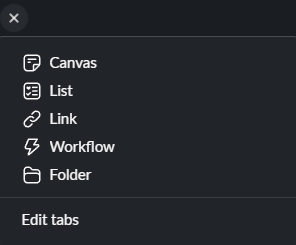
Go to a channel that you are a channel manager in (or go to a DM you have with someone) At the top of the screen, there should be a row with a plus icon. Clicking it will bring up this menu.
Then just click “canvas” to create a new canvas
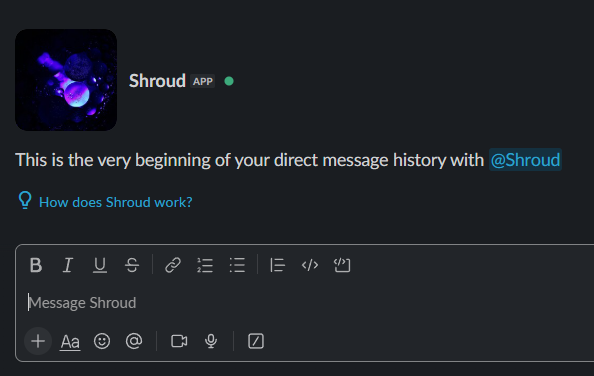
: how to use shroud
Search “shroud” in the search bar at the top of Slack to find the Shroud bot and click on the bot.
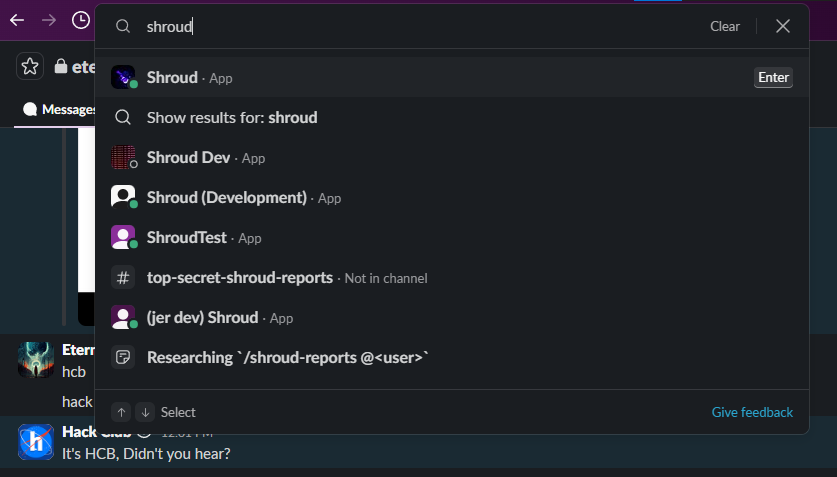
Clicking on it will open a DM with Shroud. Now, send a regular message like “John is bullying me” and your messages will be sent to the FD. You can also get replies from the FD through Shroud.
high quality project examples
High-quality projects are well polished, are not laggy, have appealing visuals, solve an issue, enhance an experience, and/or are just fun to use.
Here are some examples of high-quality projects:
- UltraPortal - Adds portals to UltraKill as a mod
- frg - A silly, non-serious programming language built around the theme of frogs!
- Crooked Rails - A 3d multiplayer game about working for a suspicious train company, hopping from station to station and working odd jobs
- Icebox - A game about bouncing an icebox to get to a goal